


Description
Offline transaction signing on a dedicated phone.
Included in the box — a full Mitilena Air license (Android, iOS, Windows, macOS, Linux) and 5 backup carriers: 2 NFC cards and 3 stealth stickers where your keys live under your password outside phone memory.
Prepare your signing phone
Take a separate NFC smartphone (an old one from a drawer or a brand-new Android or iPhone), install Mitilena Air, remove the SIM card and turn off Wi-Fi. Or, as an everyday compromise, install it on your main phone — the app itself has internet access stripped out at the OS level.
Write encrypted backup cards
Generate your wallets in complete isolation inside Mitilena Air and tap to clone your password-encrypted keys onto the 2 NFC cards and 3 stealth stickers from the box — instead of a vulnerable 12-word paper sheet. The phone’s own memory stays empty.
Pass the transfer via QR or sound
Your regular Mitilena Wallet displays live balances and prepares an unsigned transaction draft, but never holds private keys. The draft moves to your offline phone via QR code or over sound (no cables, no Bluetooth) — or directly via an app-to-app auto-link if both apps sit on the same phone.
Sign with a tap of your card
Verify the exact amount and full recipient address on your offline phone’s screen, enter your password and tap your NFC card for a second. The completed signature returns via QR code or sound — and the transaction broadcasts to the blockchain.
Why an offline smartphone beats USB crypto dongles
A conventional USB stick hardware wallet is a closed mini-computer with a cramped two-line screen and a finicky companion app where routine updates regularly break sending right when you need to move funds.
A dedicated smartphone running Mitilena Air eliminates all of that at once: you inspect every character without “blind signing”, communication needs zero cables or Bluetooth, and no vendor store or courier database holds your home address as a “hardware wallet buyer”. Any spare phone from a drawer or basic new handset from an electronics shop works.
The backup card concept: your wallet is never tied to any single phone
Keeping a standard wallet inside smartphone memory makes you a hostage to one specific device and an unencrypted 12-word paper backup: if anyone snaps a two-second photo of that sheet during a move, repair or border check, your funds are gone without a password — and unlocking the phone exposes every balance.
With Mitilena, the phone stores zero keys and acts purely as an interchangeable reader, while your encrypted wallet is cloned across 5 backup carriers in the kit. Phone brand and OS do not matter: if your handset breaks, gets lost or is replaced, just tap any backup card to another NFC phone, enter your password and keep signing.
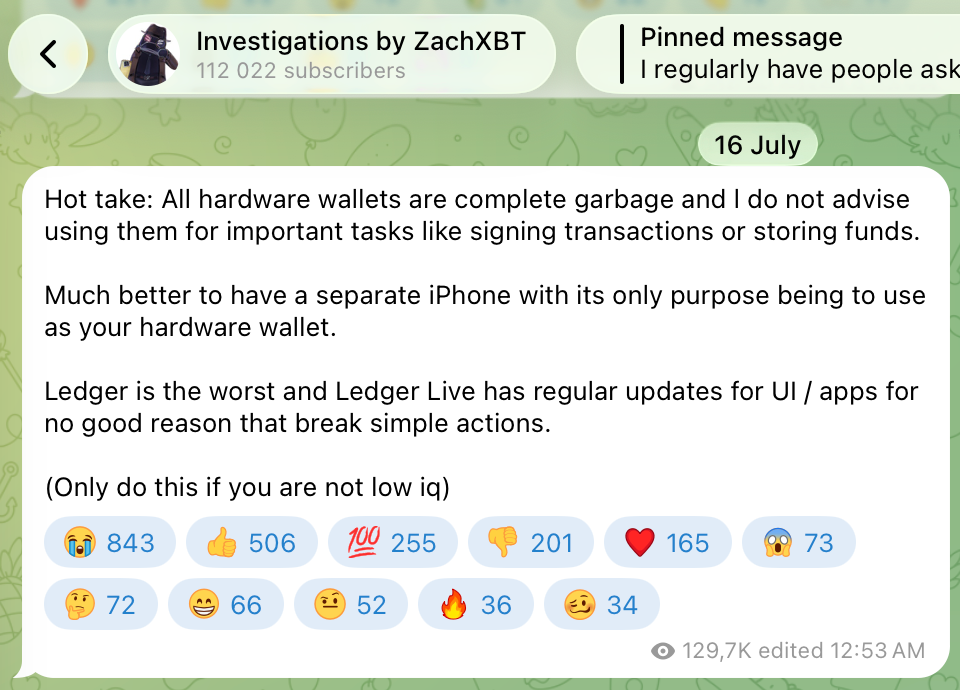
View from the industry’s top on-chain sleuth
ZachXBT — on hardware wallets and a dedicated smartphone
Everyday convenience compromise
You can also install Mitilena Air on your main phone — all offline protection stays intact
Prefer not to carry a second handset for small day-to-day transfers? Install Mitilena Air right alongside your regular wallet on your primary smartphone: internet permissions are stripped from the app at the OS level, your keys still stay exclusively on your encrypted backup cards, and unsigned drafts jump straight into Mitilena Air on the same device without needing the camera or sound.
Honest architecture
How it works:
You simply tap the card to your smartphone. The encrypted data is passed into the phone’s isolated environment (the app sandbox), the transaction is signed, and every trace is wiped from memory instantly. Practical armor that’s always at hand and forgives mistakes: even if you lose one or two backup cards from the set, your funds stay safe.
A 10+ year lifespan
A classic crypto USB stick is fragile electronics. We use mirrored NFC cards, cloned and sealed in waterproof plastic. The chance of them all failing at once is 0%.
A blind backup
Someone found your card or sticker? Great, let them keep it as a souvenir. Without your decryption password in the app, it is a completely useless piece of plastic to whoever finds it. Brute-forcing it would take 400,000 years.
Bonus one: software for generating wallets offline.
Creating a new wallet is the first and most likely place for a leak to happen.
Offline, and provable
No promises, only the architecture of the operating system. Our offline app Mitilena Air (available on iOS, Android, macOS, Windows and Linux) physically has no permission to reach the internet. Go into the app store and see for yourself: your keys have nowhere to leak to.
Picture a thief who has cracked a bank vault, sitting there surrounded by money, while the building is filled with concrete. He has the money, but he cannot walk out and carry it away.
Create your own seeds
You do not have to memorise incoherent nonsense like apple zebra tornado... Twelve random words are digital fast food for the mass market. We give you the level of a fine restaurant.
Write something like this instead: “Michael walked through Paris on 4 March 2025 and dropped a slipper into the Seine”, and that phrase becomes your seed.
You will never forget your own phrase, and you do not even need paper.

Mitilena Air: Keys mode
Along with offline signing (Sign), your license unlocks full Keys mode inside Mitilena Air for offline wallet generation and encrypted card cloning. It supports 27,000+ cryptocurrencies: from native Bitcoin (SegWit, Taproot) and Ethereum to Solana, TON and every major USDT network (TRC-20, ERC-20, SPL, TIP-3).
Need to put capital away for years? Generate addresses in total isolation and clone encrypted backups across your NFC cards and stealth stickers.

Bonus two: offline signing software at government level.
For when your capital is too large to trust to devices that are connected to the internet.
Protection against espionage
It makes no difference where your wallet sits, on a computer or on a stick. Is the environment connected to a network? Then you are exposed.
The Ultimate plan cuts off the very possibility of a digital break-in.
Your device is physically severed from the network. Against digital attacks you are protected 100%. From there on, the only thing left to worry about is a stranger in the street with a potato sack and a roll of tape.

Wallets with Google Analytics?
Forget the pseudo-hardware wallets that in practice run through online apps hung with Google analytics. That is not protection, that is a thoroughfare.
The Ultimate plan has no background listener services and no plugging sticks into USB ports. The transaction is born in a vacuum. You sign it on a device that has never seen a network, and the data is passed contactlessly via QR code or over sound.

Two levels of paranoia
For storing your main capital, use an absolute air gap: install Mitilena Air (Sign mode) on a separate smartphone with no SIM card and pass transactions only via QR code or over sound.
For everyday convenience as a practical compromise, install Mitilena Air right on your main phone — all OS-level offline restrictions remain intact, and the transaction draft hands over directly between the offline app and the online wallet without QR codes.

The illusion of long-term storage
Planning to hodl crypto for 5+ years? Get ready for a rude awakening.
Picture this: you buy a chunk of Bitcoin on an exchange and decide to hodl. Five years later you try to log in, but guess what? Anyone who didn’t submit a retina scan and a voice sample to their AI was blocked three years ago. Didn’t get the emails? Too bad. Go complain to support.
You spend a month fighting with support and miraculously get access back. Now the exchange is shocked: “Oh, look who’s a millionaire! Where did this money come from? Where exactly are you trying to withdraw it?” Your assets were sitting so nicely on their balance sheet, providing liquidity for their futures shorts, and now you want them back? They really don’t want to let it go. Bring a mountain of paperwork—originals only—and they’ll think about it. After all, you might be a terrorist. They just care about “compliance”.
Or an even simpler scenario: you open the site and see ERR_NAME_NOT_RESOLVED. The domain is dead. You can try writing letters to the Cayman Islands, to a legal entity that hasn’t existed for years. A liquidator has been running the show for a while, and everything that could be moved has already been moved—just not to your wallet.
Left it in a free software wallet on your PC or phone? Over five years, Windows will crash and be reinstalled three times, and you’ll have changed your phone twice. You download the app, log in, and the balance is zero. The local cache was wiped ages ago.
Had a classic hardware crypto stick? You plug it in after five years. It demands one firmware update, then a second one, and then it just hangs for hours, bricked. The manufacturer doesn’t care—you were supposed to have your backup seed phrase on a piece of paper anyway, right?
In reality, the only dependable way to store crypto for 5+ years is this: your encrypted access is cloned (without breaking the bank), physically distributed across multiple locations, and remains absolutely worthless to anyone who accidentally finds it. That is exactly what Mitilena provides.
Supported Networks
Mitilena Wallet supports 27,737 cryptocurrencies across 18 blockchain networks — native coins and thousands of tokens:
| Network | Native Coin | Details |
|---|---|---|
| Bitcoin | Bitcoin (BTC) | Native. Taproot (SegWit Bech32m) and Legacy (P2PKH) addresses supported |
| Ethereum | Ethereum (ETH) | Native + thousands of ERC-20 tokens |
| BNB Smart Chain (BSC) | BNB (BNB) | Native + BEP-20 tokens |
| Tron | Tron (TRX) | Native + TRC-20 tokens |
| Solana | Solana (SOL) | Native + SPL tokens |
| The Open Network | TON (TON) | Native + TIP-3 tokens |
| XRP Ledger | XRP (XRP) | Native |
| Monero | Monero (XMR) | Native. View-only and full spend wallet supported |
| Dogecoin | Dogecoin (DOGE) | Native |
| Litecoin | Litecoin (LTC) | Native |
| Zcash | Zcash (ZEC) | Native |
| Arbitrum L2 | Ethereum (Arbitrum) (ETH) | Native ETH on Arbitrum + ERC-20 tokens |
| Base L2 | Ethereum (Base) (ETH) | Native ETH on Base + ERC-20 tokens |
| Polygon | Polygon (MATIC) | Native MATIC + ERC-20 tokens on Polygon |
| Avalanche C-Chain | Avalanche (AVAX) | Native AVAX + ERC-20 tokens on Avalanche |
| Ethereum Classic | Ethereum Classic (ETC) | Native |
| HyperEVM | Hyperliquid (HYPE) | Native |
| Bitcoin Cash | Bitcoin Cash (BCH) | Native |
| USDT (Tether) | Tether (USDT) | ERC-20, BEP-20, TRC-20, SPL (Solana), TIP-3 (TON), Arbitrum, Base, Polygon, Avalanche |
Supported Token Standards
- ERC-20 — Ethereum tokens
- BEP-20 — BNB Smart Chain tokens
- TRC-20 — Tron tokens
- SPL — Solana tokens
- TIP-3 — TON tokens
- Arbitrum ERC-20 — Tokens on Arbitrum L2
- Base ERC-20 — Tokens on Base L2
- Polygon ERC-20 — Tokens on Polygon
Supported Stablecoins
- 🇺🇸 USDT — Tether
- 🇺🇸 USDC — USD Coin
- 🥇 XAUT — Tether Gold (gold-backed, 1 token = 1 oz gold)
- 🇺🇸 USDe — Ethena USDe
- 🇺🇸 DAI — Dai
- 🇺🇸 FDUSD — First Digital USD
- 🇺🇸 PYUSD — PayPal USD
- 🇺🇸 USDD — USDD
- 🇺🇸 TUSD — TrueUSD
- 🇺🇸 USDP — Pax Dollar
- 🇺🇸 GUSD — Gemini Dollar
- 🇪🇺 EURC / EURT / EURS — Euro
- 🇹🇷 TRYB (BiLira) — Turkish Lira
- 🇧🇷 BRZ — Brazilian Real
- 🇨🇳 CNHT — Offshore Chinese Yuan
- 🇯🇵 GYEN / JPYC — Japanese Yen
- … and hundreds more — just search your stablecoin in the wallet.
Supported Tokenized Stocks
- AAPL — Apple
- TSLA — Tesla
- NVDA — NVIDIA
- MSFT — Microsoft
- AMZN — Amazon
- GOOGL — Alphabet (Google)
- META — Meta
- MSTR — MicroStrategy
- COIN — Coinbase
- SPY — S&P 500 ETF
- … and many more.
View the full list of all 27,737 supported cryptocurrencies →



Jan R. –
The offline signer really is another league. I run it on a completely cut-off phone and signing transactions through QR codes works absolutely smoothly. You finally get the feeling that the money is controlled by you alone and no background script is going to take it. This is exactly the level of security I was looking for for my main stack.
Kryptoguru.eth –
Offline signing through QR codes is the only way to sleep 100% soundly with your portfolio.
Max K. –
Keep Mitilena Air on an old iPhone with no SIM and Wi-Fi off, while my regular online wallet sits on my daily Android. I usually pass transfers via QR, so it was a nice surprise that a transaction goes through cleanly even without a camera — just over sound (you can clearly see how cool this works in the video). Keys stay only on password-protected NFC cards.